Practical SEO Guide for WordPress: keywords, search intent and on-page optimization. Many website owners find SEO difficult to manage, especially when technical terms and frequent changes in search results display appear. For WordPress, the good news is that there are clear steps that can be applied in order, without needing a large team or expensive tools. If you manage a WordPress website and want more organic traffic, this material explains what is worth doing, why it matters and how to verify results. The goal is simple: your content answers user questions correctly, and the search engine easily understands the topic of your pages. For this, three elements are needed: keyword research, understanding search intent and on-page optimization.
What are keywords and why are they the foundation of WordPress SEO
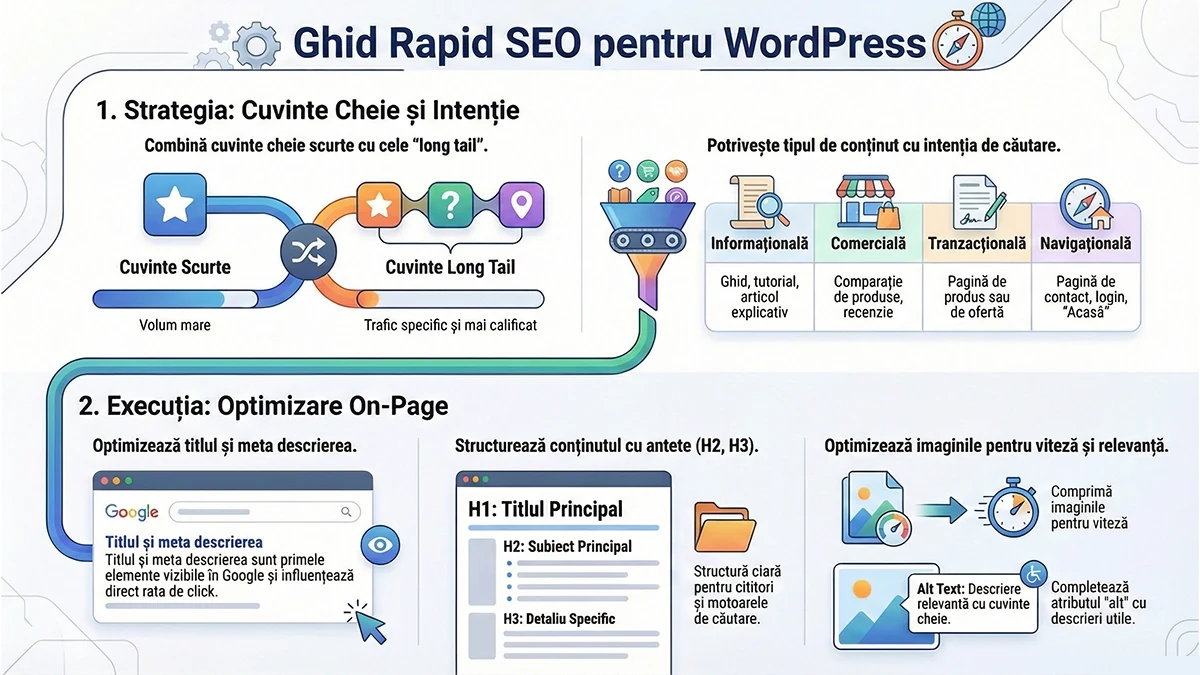
Keywords are the expressions that users enter in search engines when looking for an answer, a product or a service. In practice, these expressions are a mirror of real problems and needs. If you use the right keywords in titles, in content and in the technical elements of the page, you send a clear signal about the relevance of that content. Infographic Practical SEO Guide for WordPress In WordPress, the role of keywords is twofold. On one hand, they help structure articles around a clear topic. On the other hand, they help connect the page with the right queries. Without this connection, even a good article can remain invisible to the right audience.
Types of keywords: short, long tail and the role of intent
Short keywords: general terms, with high volume and high competition, like "WordPress" or "SEO optimization". They are useful for general direction, but are harder to win in the short term.
Long tail keywords: longer, more specific expressions, like "optimize WordPress images for speed" or "WordPress SEO plugin for service pages". They attract better-matched traffic and typically have lower competition.
Semantic variants: expressions similar in meaning, which appear naturally in text and clarify the topic. For example, for material about performance, "speed", "loading time", "Core Web Vitals", "cache" may appear.
Furthermore, search intent determines whether a keyword is worth using in an article, on a service page or on a product page. This is one of the most frequent mistakes: an informational page tries to rank on transactional terms, or vice versa.
Search intent is the real reason the user is searching. If you match your content to the intent, the ranking chance increases and the quality of traffic improves.
Informational intent: the user is looking for explanations and steps. Example: "how do I optimize images in WordPress". Appropriate content is guides, tutorials, checklists.
Commercial intent: the user compares options. Example: "best WordPress hosting". Appropriate content is comparison, criteria, advantages and limitations.
Transactional intent: the user is close to making a decision. Example: "buy SEO plugin license". Appropriate content is a product page or offer page, with clear steps.
Navigational intent: the user is looking for a brand or specific page. Example: "Elementor login". Appropriate content is a clear page, easy to find, with simple structure.
If you are not sure about intent, the fastest test is analyzing existing results. If the top results are guides, then the search engine prefers informative content. If they are product pages, then it prefers transactional content.
Useful tools for keyword research
Research doesn't have to be complicated. To start with, a combination of free tools and a disciplined working method is enough.
Google Keyword Planner: useful for ideas and volume ranges (requires Google Ads account).
AnswerThePublic: useful for real user questions and phrasings.
Ubersuggest: useful for quick ideas, with limitations in the free plan.
Ahrefs, SEMrush, Moz: useful for competitive analysis, difficulty, competitors' keywords and monitoring.
A practical criterion: track a combination of low and medium difficulty keywords for faster results, plus a few higher difficulty keywords for long-term goals.
Step-by-step method to find the right keywords for WordPress
If you want a repeatable process, you can use a simple 6-step flow:
List main topics: services, categories, frequent issues, questions received from clients.
Transform topics into queries: include "how", "what is", "price", "guide", "plugin", "settings", "error".
Check volumes and long tail variants in tools.
Analyze the results page for each term: type of content, format, length, visual elements, frequently asked questions.
Group keywords by page: one main page, then secondary topics that link internally.
Plan content over 4 to 8 weeks, with monthly updates.
A good hint that you chose correctly: there is a clear match between the keyword, title, structure and FAQ questions. When this match is missing, the page tends to fluctuate in rankings.
Competitive analysis: what's worth taking and what should be avoided
Competitive analysis is useful when used ethically. The goal is to understand what type of pages win, what questions get answered and what gaps remain uncovered.
Identify competitors in results, not just commercial competitors. Sometimes the real competition is a blog or a large platform.
Check what keywords their pages rank for, using tools like Ahrefs or SEMrush.
Look for gaps: topics treated superficially, missing steps, unclear examples, lack of FAQ, lack of WordPress captures or settings explained.
A principle that works: if you deliver a more complete and easier-to-apply answer, you have better chances of beating older or weaker pages, even on larger domains.
Mastering WordPress on-page SEO: what is optimized directly on the page
On-page SEO includes all adjustments made on the page: titles, subtitles, text, internal links, images, structure and meta elements. In WordPress, these elements can be easily managed with an SEO plugin, but the plugin doesn't do the work for you. It just provides fields and checks.
Title tag and meta description: first visible signals in Google
The title tag is the title displayed in search results. The meta description is the short text that explains what the user will find on the page. Together, they influence click-through rate and topic clarity.
Include the main keyword in the title, as close to the beginning as possible.
Write a title that promises a concrete result: guide, steps, checklist, solutions.
The meta description should summarize the content and indicate usefulness: what does the user learn and what do they get after applying it.
In this article, the main expression is WordPress SEO and should be used naturally, in the title, in the first paragraphs and in a few relevant sections, without mechanical repetition.
H2 and H3 headings: structure for reader and search engine
In WordPress, clear structure helps the reader quickly scan the page. It also helps the search engine understand secondary topics. For stable results:
Use a single H2 as the main title of the article.
Use H3 for sections that answer real questions.
Avoid vague titles. A good title says what follows and who it benefits.
Content optimization: natural density, clarity and usefulness
A good article is not just long. It is clear and applicable. For material about WordPress, real value appears when you describe steps, settings and checks that can be followed.
Write short paragraphs, 2 to 3 sentences, for easy reading.
Include examples of long tail queries and explain why they are useful.
Use lists for steps and checks, not for padding.
Connect articles together through internal links, to relevant guides.
For semantic variation, the expression WordPress SEO can be supported by terms like "SEO plugin", "meta description", "search intent", "on-page optimization", "long tail keywords".
Image optimization in WordPress: a quick SEO and speed gain
Next steps: short checklist for implementation in WordPress
If you want to immediately apply what matters most, follow this list:
Choose 1 main keyword and 5 to 10 long tail variants.
Check search intent in the results page and adapt the article format.
Write the title and meta description with clear promise and usefulness.
Structure the article with H2 and H3, with sections that answer real questions.
Add a relevant FAQ, derived from user questions.
Optimize images and link the article internally to other important pages.
Call to action
If you want this type of optimization to be applied consistently across WordPress articles and pages, the next useful step is an editorial plan based on keywords and search intent, plus an on-page checklist for each published material. Send the main topic of your website and the types of services or categories you want to promote, and the keyword and topic structure can be built around your goals.
We use cookies to understand how the website is used and to show you relevant content. You can accept all, reject them, or choose only what you want. Details in the cookie policy.