
Home › PWA Tester
PWA Tester
PWA Tester: check whether your website meets the Progressive Web App standards. Our free tool looks at 34 critical points, from the manifest and the service worker through to icons, advanced capabilities and offline support.
GOAI PWA Tester
Check any website against the PWA standards
Analysing...

What does GOAI PWA Tester check?
The tool runs an automatic analysis of the three essential parts of a PWA and gives a percentage score for each category.
Web app manifest (20 checks)
The manifest is the JSON file that defines the identity of your PWA. We check the required fields (name, short_name, start_url, display mode, 192x192 and 512x512 icons, share_target), the recommended fields (screenshots, description, colours, shortcuts, categories, IARC rating) and the optional ones (protocol handlers, Edge Side Panel).
Service worker (6 checks)
The service worker is the engine behind every working PWA. We check whether it is registered correctly and reachable, and whether it has a handler for fetch (intercepting requests), push (notifications), install (offline support through caching) and background sync.
App capabilities (8 checks)
The advanced checks cover: an HTTPS connection, a maskable icon (for Android adaptive icons), display_override, launch_handler, a defined scope, plus support for Windows Widgets, file handlers and note taking.
How does it work?
- Enter the address, any website, not only your own.
- Automatic analysis: the tool downloads the page, the manifest and the service worker, checks the real icon dimensions and validates every field against the W3C specifications.
- Instant report: you get a total score with the detail of each check, marked ✅ passed, ❌ failed or ⚠️ warning, plus a JSON preview of the manifest.
Why does a PWA matter?
A Progressive Web App turns your website into an installable application that works offline, sends push notifications and gives a native feel on any device. The main advantages:
- Installation without an app store: visitors install the app straight from the browser
- Offline operation: the essential content stays available without an internet connection
- Push notifications: you stay in touch with visitors even after they leave the site
- Better performance: fast loading through intelligent caching
- Stronger SEO: Google favours sites with a working PWA
A tool built on the PWABuilder criteria
Our checks follow the PWABuilder standards from Microsoft, the same tool developers use worldwide to validate a PWA. The difference is that GOAI PWA Tester is free and returns results instantly, with no sign-up.
Do you need a PWA for your website? Get in touch and we will help you build it.
We can create Progressive Web Apps for any kind of website, with your data, your brand and whatever information you want inside.
How to test a PWA in Google Chrome
Google Chrome has built-in tools for checking and debugging Progressive Web Apps. Here are the steps.
Quick check
- Open the website you want to test in Chrome
- Press F12 (or right-click, then Inspect) to open DevTools
- Go to the Application tab in the top bar
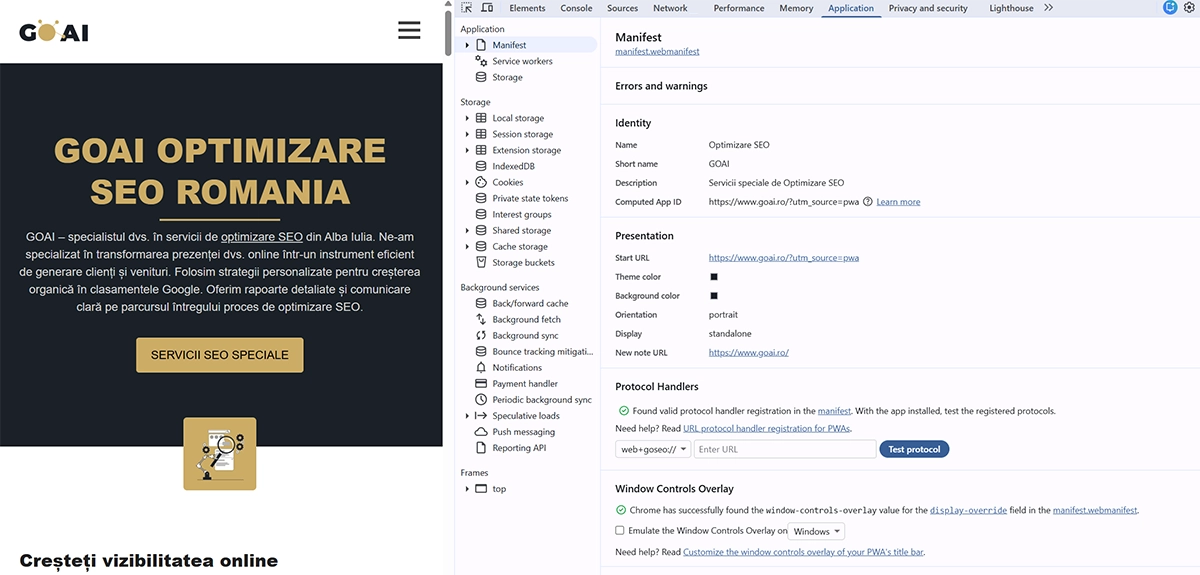
Checking the manifest
In the panel that opens, under the Manifest section, you can see:
- Identity: the app name, short name and description
- Presentation: display mode, orientation and colours (theme colour, background colour)
- Icons: every declared icon with its dimensions
- Protocol Handlers: the protocols the app registers
If there are problems, Chrome shows them in red under Errors and warnings.
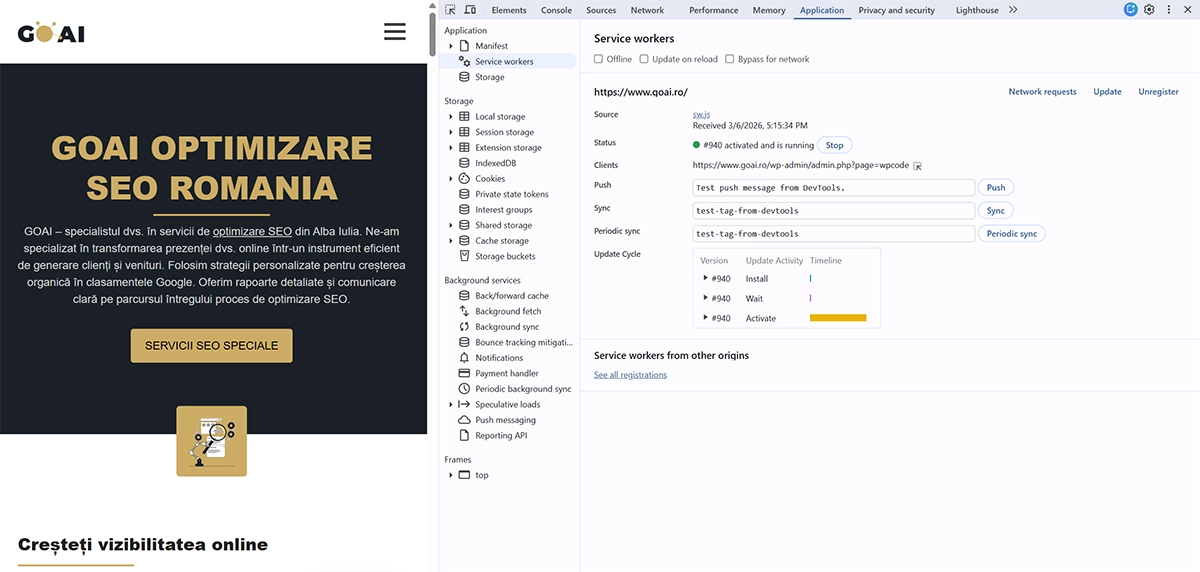
Checking the service worker
Still in the Application tab, under Service Workers, you can see:
- Status: whether the service worker is active and running
- Source: the source file, sw.js for example
- Offline: tick this option to simulate a lost connection and test the offline behaviour
Checking cache storage
Under Cache Storage you can see which resources the service worker has saved for offline use. At the very least, the offline fallback page should be there.

Simulating an installation
To test the install process:
- Open the website in Chrome
- Look for the install icon in the address bar (a monitor with a downward arrow)
- Alternatively, from the Chrome menu (the three dots at the top right), choose Install app
- The app installs and appears in the Start menu, on the desktop or in your app list
The history of Progressive Web Apps, and who deserves the credit
The Progressive Web App concept was introduced officially in 2015 by Alex Russell and Frances Berriman, two Google engineers. The term described a new category of web application that can be installed on a device and works offline, without needing an app store.
PWA timeline
- 2007: at the iPhone launch, Steve Jobs proposes that apps should be web apps accessed through Safari. The idea is dropped in favour of the App Store in 2008.
- 2011: Google introduces the Chrome Web Store and the idea of installable web apps.
- 2013: Mozilla launches Firefox OS, an operating system built purely on web technology.
- 2014: the W3C publishes the Service Worker specification, the technical foundation that makes offline operation possible.
- 2015: Alex Russell and Frances Berriman of Google define the term Progressive Web App and set the criteria: HTTPS, service worker, web app manifest.
- 2016: Chrome 51 adds full PWA support on Android. Opera and Samsung Internet follow quickly.
- 2017: Microsoft announces PWA support in Windows 10 and Edge. Twitter launches Twitter Lite as a PWA.
- 2018: Apple adds service worker support in Safari 11.1 (iOS 11.3). PWAs now work on every major platform.
- 2019: Google launches PWABuilder, now maintained by Microsoft, for validating and generating PWAs. Samsung, Starbucks and Pinterest adopt PWAs at scale.
- 2020: the COVID-19 pandemic speeds up PWA adoption, because of the need for fast apps that work on any device.
- 2021: Chrome introduces the Richer Install UI, with screenshots and descriptions. Apple improves PWA support in Safari.
- 2022 and 2023: PWAs gain advanced capabilities: file handling, protocol handlers, window controls overlay, web share target.
- 2024 and 2025: Apple adds push notifications for PWAs on iOS 16.4 and later. PWAs become standard for enterprise and e-commerce applications.
Why do PWAs matter today?
More than 30% of Fortune 500 companies use PWA technology, and the trend keeps growing as the capabilities move closer to those of native apps.
Who maintains the standards
- W3C (World Wide Web Consortium): the web app manifest specification
- WHATWG: the service worker specification
- Google: the biggest backer, and Chrome has the most complete support
- Microsoft: PWABuilder, plus Windows 11 integration (widgets, taskbar, Start menu)
- Apple: growing support, still narrower than Android or Windows
So our GOAI PWA Tester checks standards that have taken ten years to develop, from 2015 to today.
Testing on mobile
- Open the website in Chrome on your phone
- If the site has an install banner, it appears on its own
- Alternatively, from the Chrome menu, choose Add to Home screen
- The app appears on the home screen like a native application
Uninstalling
- Windows: Settings, Apps, Installed apps, find the app, Uninstall
- Android: press and hold the app icon, then Uninstall
- Chrome: go to
chrome://apps, right-click the app, then Remove from Chrome